Configuring Expression Redistribution
Expression redistribution allows a single meter or meter group to retrieve its gross energy load forecast value from another meter or meter group’s net forecast value. For example, this can be useful when a newly created meter is not ready to have an associated trained neural network. For the time being, it can receive a forecast value from a meter in a similar weather location. Expression redistribution configuration takes the form of an arithmetic expression.
Redistributions can be configured to occur at various points during the energy load forecasting process. For example redistributions can be configured to occur after all direct forecasting, after all assignments from parent groups, or after all group aggregation.
Note: See Configuring Balancing Redistribution for information about Balancing Redistribution.
To Configure Expression Redistribution
- Click the Meters/Owners page of the ELF Editor.
- Add a New Child or New Sibling, or double-click to Edit a configured meter.
- Configure the properties in the General page.
- Click the Assignments page.
- Click Expression Redistribution from the Value Assignment Type drop-down menu.
- Click Redistribution to view the Edit Redistribution Rule dialog box.
- Configure the rule using the properties described below.
|
Edit Redistribution Rule |
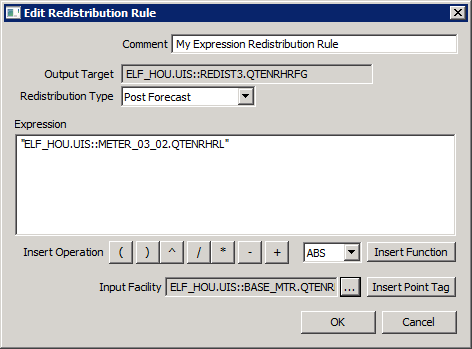
The properties on the Edit Redistribution Rule dialog box are described below.
| Parameter | Description | ||||||||||||||||
|---|---|---|---|---|---|---|---|---|---|---|---|---|---|---|---|---|---|
|
Type an optional description or reason for the balancing. Maximum length is 80 characters. |
|||||||||||||||||
|
The destination target facility for the redistribution rule. |
|||||||||||||||||
|
Select the redistribution type to indicate when during the forecasting process to have redistribution occur. Options include:
|
|||||||||||||||||
|
The arithmetic expression to be used for redistribution for the meter or meter group. The expression may consist of constant value terms, operations, functions, and/or input meter or group facility tags. In the case of a facility tag, the net forecast value for the meter or group will be substituted. |
|||||||||||||||||
|
Click to insert the desired operation into the expression: parentheses, exponentiation, division, multiplication, subtraction, and addition. |
|||||||||||||||||
|
Function |
Select one of the following functions:
|
||||||||||||||||
|
Insert Function |
Click to insert the selected function into the expression. |
||||||||||||||||
|
Click … to select the input facility for the redistribution rule. Note: CygNet tags as operands in the expression must be enclosed in double quotes (for example, "ELFTEST.UIS::METER-1.VOLLF"+"ELFTEST.UIS::METER-2.VOLLF"/2). |
|||||||||||||||||
|
Insert Point Tag |
Click to insert the selected point tag into the expression. |


